YAFL will launch fxe and gxb files stored in gpmm.
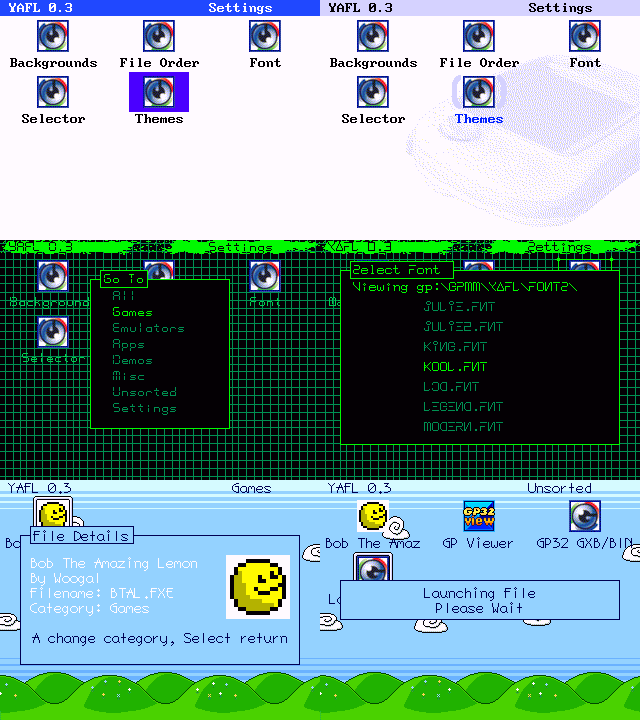 Features
- User configurable categories
- User icon support
- Themes
- SMC swapping (don’t change cards while loading themes/graphics, launching files, or saving setting, but any other time should be fine)
Installation
Put yafl.fxe in gpmm, themes in gpmm/yafl, and background and selector graphics in gpmm/yafl/bg and gpmm/yafl/iconhl
Place any custom icons in gpmm/yafl/icons (see the readme file there for more details)
Select your theme/graphics from the settings screen. Use B to bring up the change category menu, and select Settings from the list.
To edit categories you should modify the file yafl.cfg in gpetc (if this file isn’t there, run yafl then select save settings). The structure of this file is as follows –
[category1]
#
file1.fxe
file2.fxe
[category2]
#
file3.fxe
file4.fxe
... etc
Modify between [ and ] to change the category name, or add new categories with
[newcategory]
#
(the # is important).
Controls
A – Launch File
B – Move to category
Select – Show file info and change file category
Start – Save settings
When multiple pages are available (look for arrows in the top right), continuing moving down or up will switch pages
On popup screens, select will return to the launcher screen.
A change to the chosen theme or graphics is saved immediatly. Other changes are saved when a file is launched or by pressing Start.
Themes
Backgrounds should be 320×240 8bit (256 color) gif’s, using the standard gp32 palette. Selector graphics are also 8bit gifs in the standard palette, but with a size of 60×40 (Note – If your selector graphics cause YAFL to crash, try increasing the dimensions to 320×240 with the actual graphic in the top left corner).
A theme file should end in .thm and has the following structure (see provided themes for examples ) –
path\to\background
path\to\iconhighlight\image
Background color(all colors 0-255 from standard gp32 palette unless stated)
titlebar color (set to 256 to make transparent)
titlebar text color
icon text color
icon text highlight color
icon highlight color (set to 256 to make transparent)
icon text background (set to 256 to make transparent)
popup box border
popup box fill
popup box text
alternative popup box text (used for alerts and selections)
path\to\font
END
Auto Booting
You can set YAFL as your default file launcher if you have multifw. Simply set pacrom as your default firmware, then in pacrom set yafl.fxe as your quicklaunch item (from options enable quicklaunch, then in the file browser select yafl.fxe with B followed by A). If you want to bypass pacrom’s quicklaunch hold down left and right while booting.